Google Discover’s 9-Step Content Pipeline (SDK Telemetry View)


Google Discover’s 9-Step Content Pipeline (SDK Telemetry View)
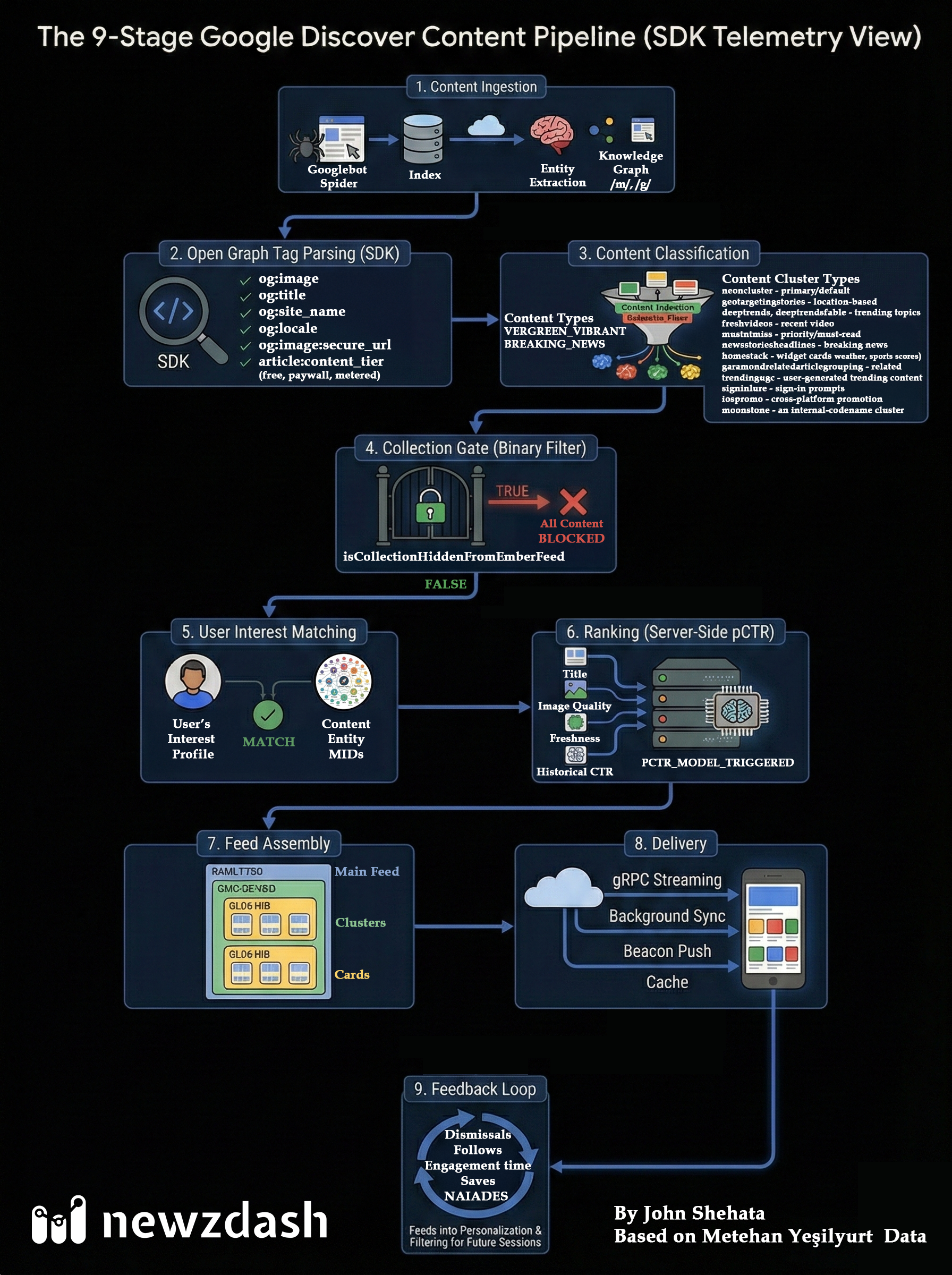
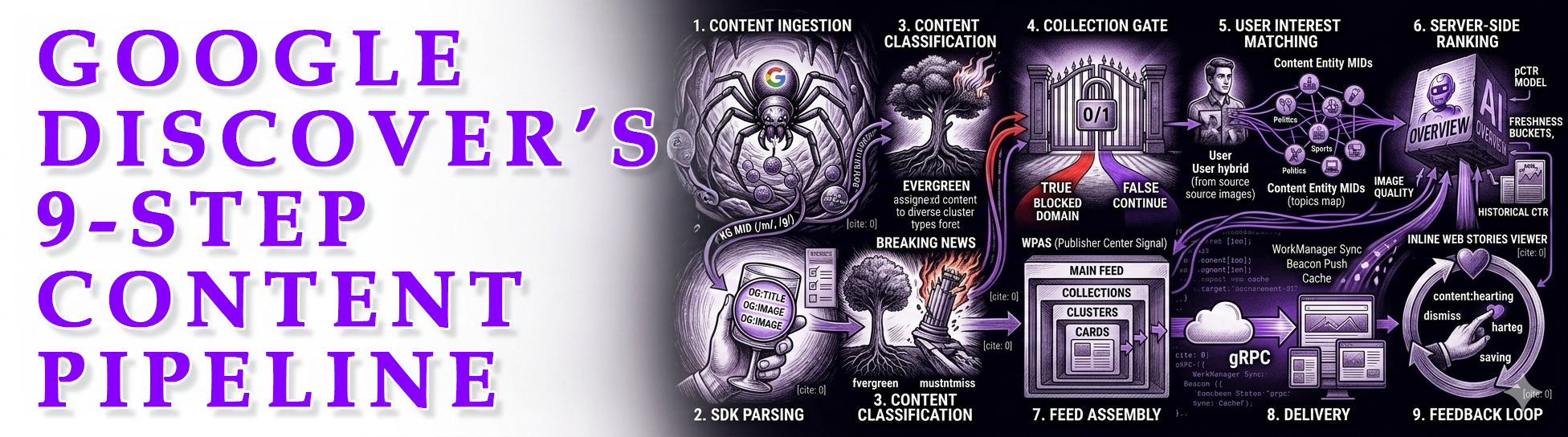
Discover isn’t “one ranking algorithm”. It’s a pipeline. Content moves through stages, and you can fail early for reasons that have nothing to do with “ranking”.
>> Scroll down for the full high def infographic.
Why this matters
Most teams debug Discover like Google Search. That’s the trap.
A Discover drop is not always ranking. Sometimes it’s a render issue, a gate/filter issue, or normal delivery and experiment volatility.
This is analysis is based on Metehan Yeşilyurt's excellent investigative analysis of Google Discover SDK Telemetry:
Step 1: Content ingestion
This is the “you can’t rank if you’re not in the system” stage.
Google crawls and indexes your content, then starts extracting meaning: entities, topics, relationships, and sometimes the “type” of story it thinks you wrote.
What can go wrong here
If crawling or indexing lags, you lose the first-week freshness window before you even have a chance.
If canonicals are messy, Google might attach signals to the wrong URL, or treat duplicates as separate items.
If images or key resources are blocked, you can still index the page, but the card quality downstream can suffer.
What to monitor
Indexing speed for breaking pages, canonical correctness, robots rules, RSS/XML sitemap health, and whether your image CDN is crawlable.
Practical move
Have a “breaking URL checklist” that runs automatically: indexable, canonical, OG present, hero image reachable, fast render.
Step 2: Open Graph tag parsing (SDK)
This is not “social meta”. This is feed metadata.
Discover needs consistent title + image inputs to render cards, and the SDK research suggests it has strict logic for how it pulls and falls back when tags are missing.
Key note
Required for card rendering: og:image + og:title (with fallback chains).
Why this is a big deal
A tiny template change can break Discover distribution sitewide, and it will look like an algorithm hit, even when it’s really a render issue.
Also, your “best image for readers” is not always “best image for Discover”. Discover cares about minimum dimensions and clean fetchability.
What to check
OG title present and not empty, OG image is absolute URL, HTTPS works, image not blocked by robots, image actually returns 200 and not a redirect chain, image dimensions large enough, and the page is not injecting weird meta behavior through plugins.
Practical move
Add an OG validator in your CMS release process and alert on regressions the same way you alert on downtime.
Step 3: Content classification
Discover tries to understand what the content is: breaking, evergreen, video-heavy, trend narrative, location-based, and so on.
Classification affects which “bucket” you compete in and how your card gets placed.
What can go wrong here
If your headline is clever but vague, the system can misclassify the topic or fail to assign strong entities.
If your page layout is inconsistent, the classifier can struggle to extract the right signals cleanly across templates.
What to do
Make the topic obvious in the first sentence, not just in paragraph six.
Use consistent naming for people and organizations, and don’t swap between nicknames and formal names inside the same article.
Practical move
Build internal guidance: “Discover headlines should contain at least one clear entity + one clear topic anchor.”
Step 4: Collection gate (binary filter)
Before interest matching or ranking, there’s an on/off checkpoint at the publisher or collection level.
If the collection is hidden, you’re out. No headline tweaks will fix that, because your content never reaches the later stages.
Why this changes how you debug drops
If you see a domain-wide cliff across sections, don’t start with “our headlines got worse”. Start with “did something block us, or did we break something sitewide”.
What triggers this in the real world
You can’t see Google’s internal switches, but you can see the outcomes.
High negative feedback patterns can make a publisher look “less desired” to users at scale, even if only a subset of stories caused it.
How it shows up
New content stops getting Discover impressions, not just lower CTR.
The drop is broad, not isolated to one section or one story type.
Practical move
Create a “collection gate alert”: if new articles in multiple sections receive near-zero Discover impressions for X hours, escalate as a systemic issue.
Step 5: User interest matching
Now we’re in personalization territory.
Your content’s entities are matched to what a user has shown interest in: topics they follow, things they engage with, and patterns from their broader activity.
Why entity clarity matters
Discover can’t “match” what it can’t name.
If your headline says “TikToker lands big break”, that’s a generic descriptor, not a strong matchable entity. Name the person, the brand, the show, the event.
What works
Specific entities, specific stakes, specific “why now”.
Headlines that read like real news, not like a teaser.
Practical move
If you want Discover reach, ban curiosity-gap patterns in Discover-targeted headlines: “you won’t believe”, “this is why”, “what happened next”, “fans shocked”.
Step 6: Ranking (server-side pCTR)
Ranking is pCTR, but the model is server-side.
The client packages signals and sends them, Google scores it on their side.
What’s safe to say
Title (sent in ContentMetadata payload)
Image quality signals
Freshness signals
Historical performance signals like clicks vs shows
pCTR model triggers server-side
What this means in practice
Yes, headline and image matter.
But Discover also learns from what happens after the click, so CTR tricks that create disappointment can backfire over time.
Practical move
Optimize for “good clicks”, clicks that lead to engagement, not just clicks that lead to bounces.
Step 7: Feed assembly
Discover assembles the feed into a structure, not just a sorted list.
Think: main feed, collections, clusters, cards. Placement and layout can change outcomes.
Why this matters
Two similar stories can perform differently based on what cluster they land in, what other cards surround them, and how the card is rendered (thumbnail vs hero, AI summary present or not, etc.).
Practical move
When you analyze performance, separate “story quality” from “placement effects”. Not every miss is an editorial miss.
Step 8: Delivery
Delivery is a live system, not a one-time fetch.
Streaming, background sync, beacon push, and caching can all deliver content, update it, reorder it, or pull it back.
Key note
Surfaces: MINUS_ONE (swipe-left) and MAIN_FEED (Google app).
What this explains
Why you can see a spike, then the card disappears.
Why two users can see different mixes at the same time.
Why Discover sometimes feels “chaotic”, because it’s not a static list.
Practical move
When doing post-mortems, use time windows and cohorts. A single snapshot can be misleading.
Step 9: Feedback loop
User behavior feeds personalization and filtering for future sessions.
Dismissals, follows, saves, and engagement time matter, because Discover learns what each user wants, and what they don’t.
What this means for publishers
Bad expectation setting is expensive. If your headline promises something the article doesn’t deliver, users bounce, dismiss, and you train the system against you.
This is why clickbait can “work today” and hurt tomorrow.
What to optimize for
Accurate packaging, fast value delivery in the first screen, clean reading experience, and content that matches the promise.
Practical move
Track post-click satisfaction proxies: short sessions, low scroll, low engagement, and treat those as Discover risk signals.
How to debug Discover drops (simple)
1) Render issue: OG/image/template problem
2) Gate/filter issue: collection-level cliff >> Traffic massive drops
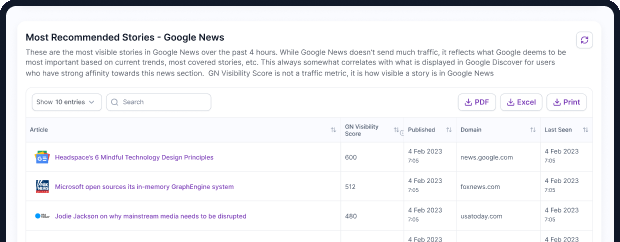
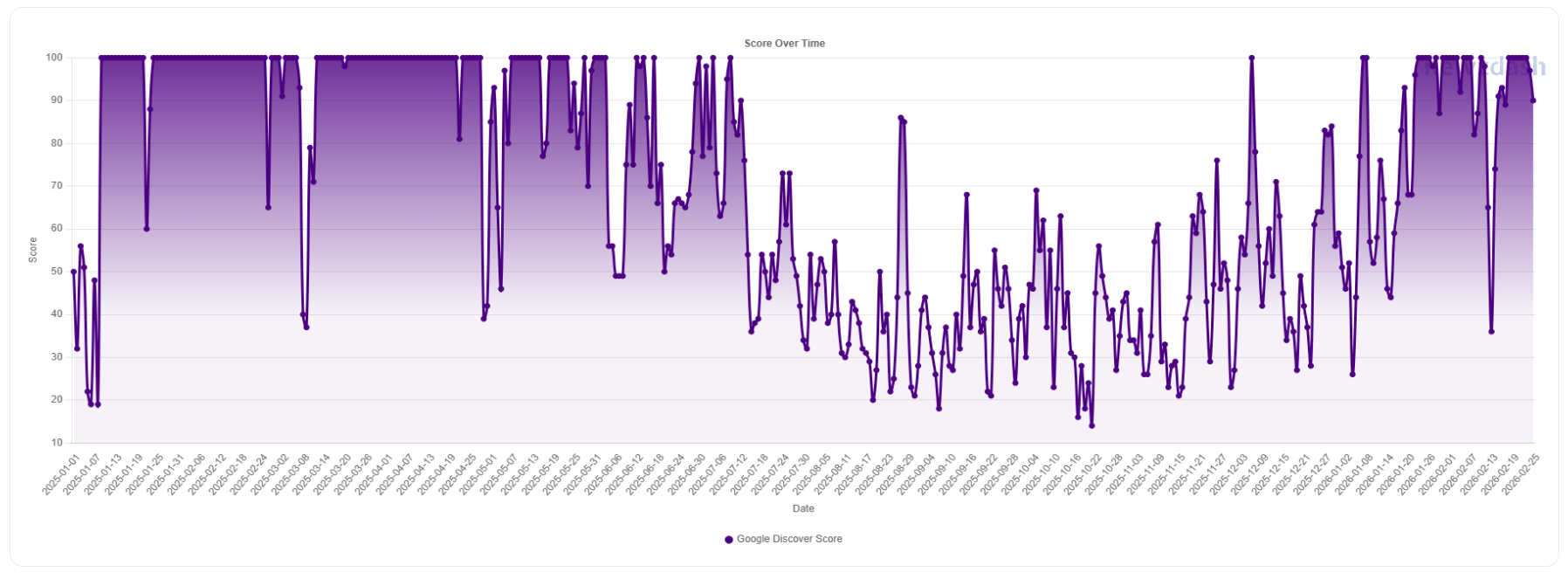
3) Normal volatility: experiments and delivery churn >> Use NewzDash DiscoverPulse to measure visibility of content categories in Google Discover. For example Entertainment content suffered major visibility loss at end of 2025.
Bottom line
Discover is distribution engineering. Win the pipeline, not just the headline.
Research links
https://metehan.ai/blog/google-discover-architecture/
https://metehanai.substack.com/p/i-read-google-discovers-sdk-so-you
https://metehan.ai/discover